
Set up · Passed locally
SitRep · In action
Three workflows. Three seconds each.
Real captures from the launch-ready synthetic product: arranging a room, protecting the classroom display and reviewing a live lesson draft.
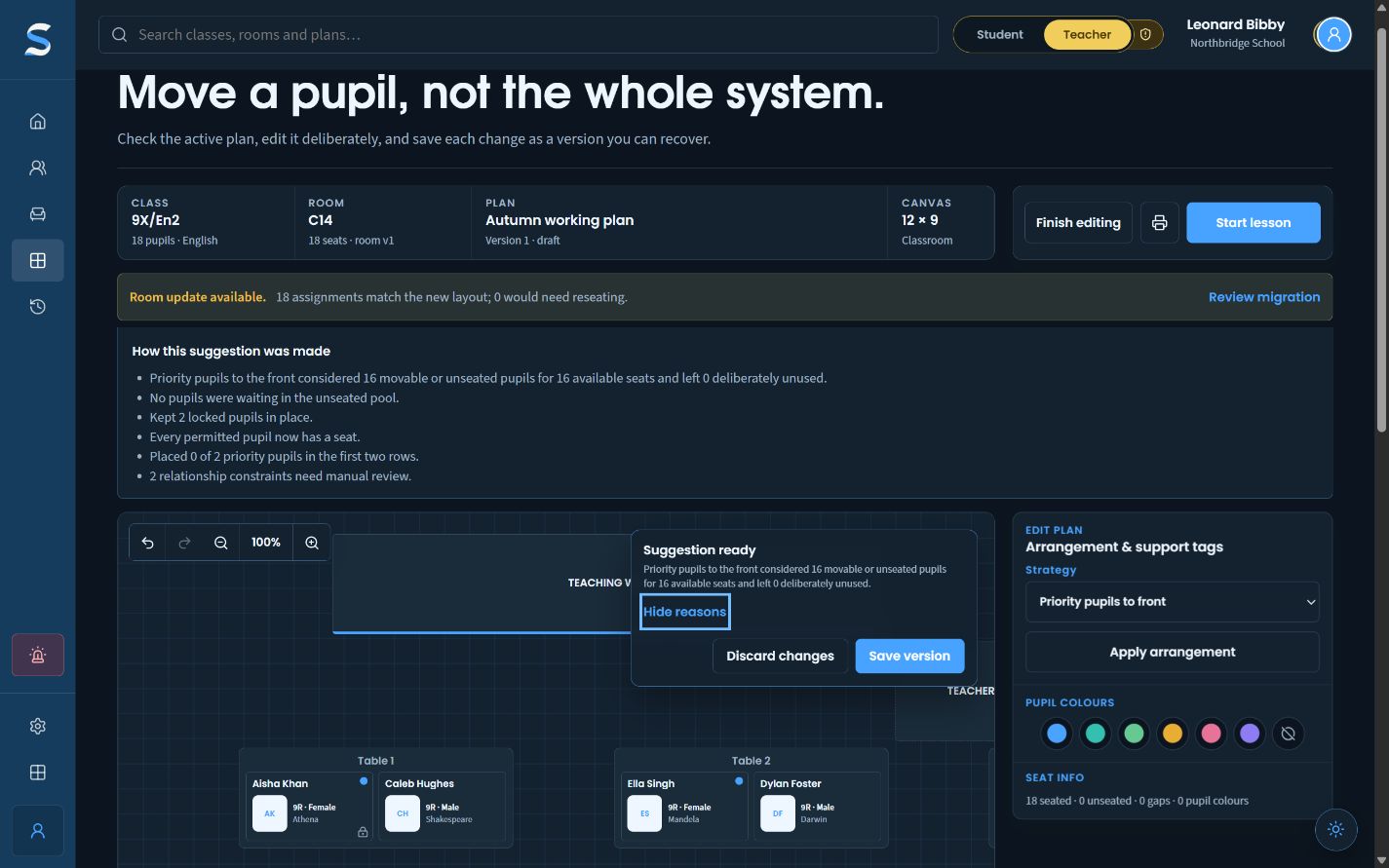 01 · Explainable arrangementArrange a class
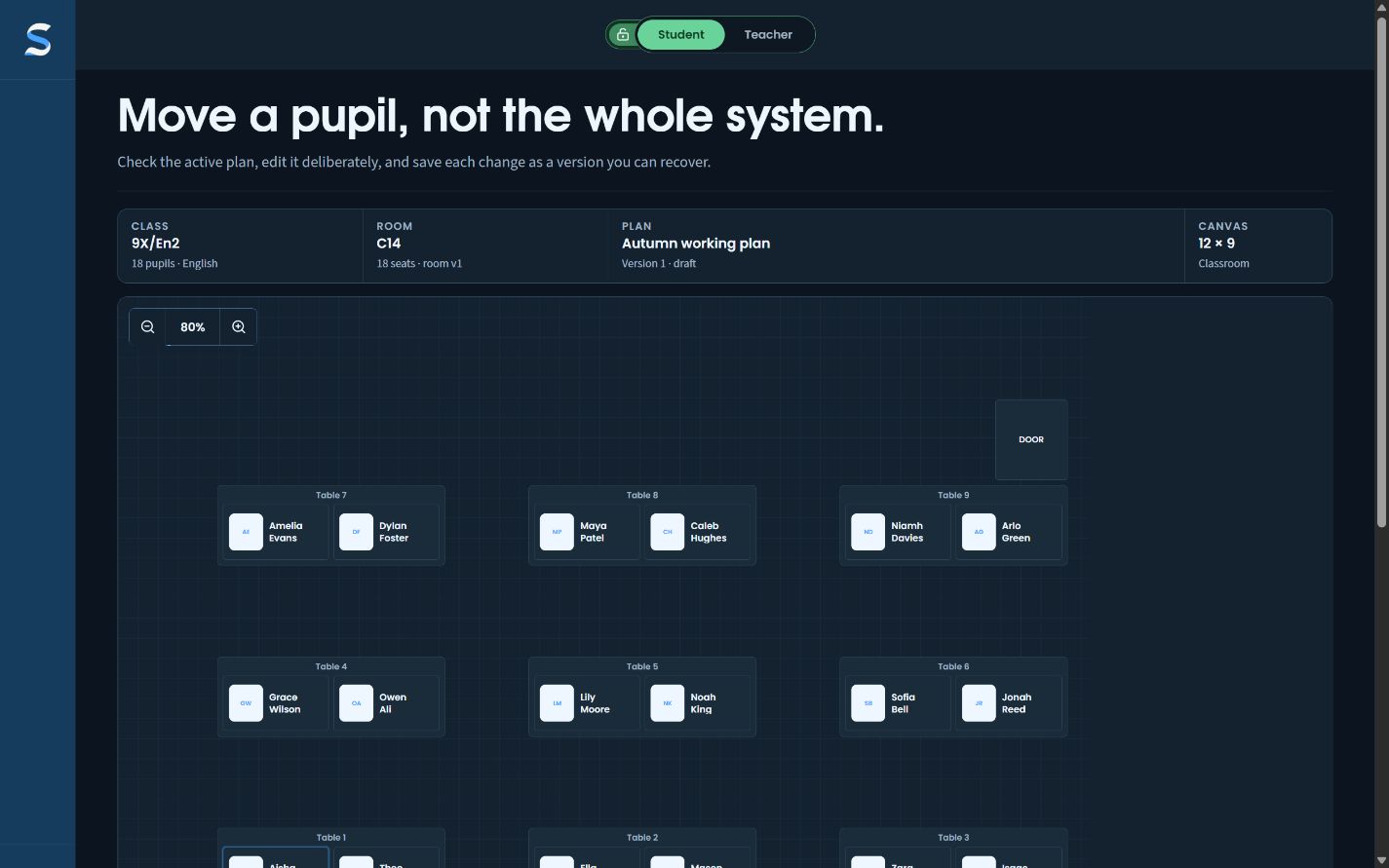 02 · Audience-aware planProtect the display
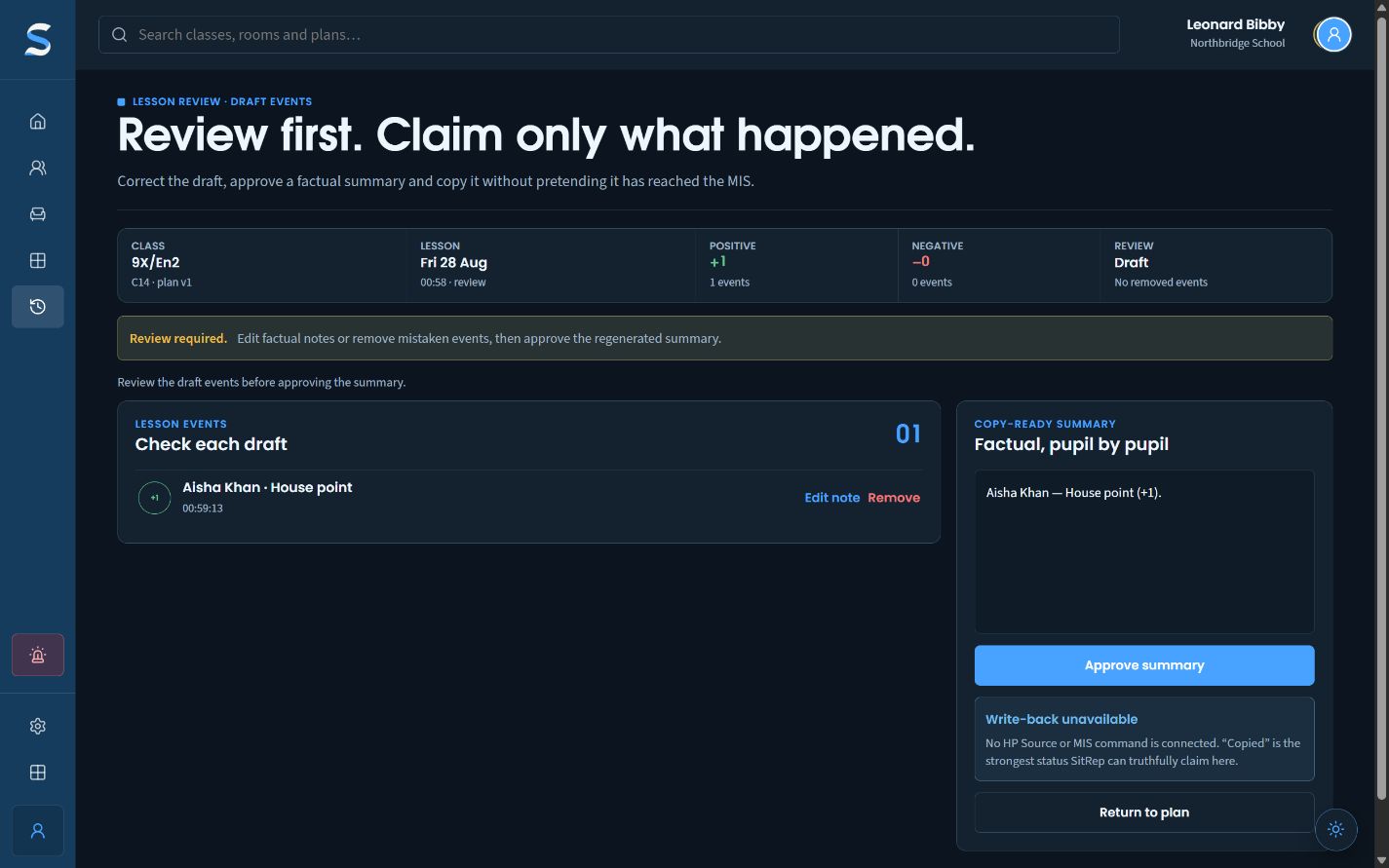 03 · Live lesson recordReview a lesson
The operational problem
A seating plan is a theory of the classroom.
Every seating plan makes claims about attention, access, relationships and the kind of lesson a room should permit. Most are simply too static to admit it. SitRep treats arrangement as revisable professional judgement: grounded in the real room, assisted by explainable rules and always open to the teacher who knows the class.
Teachers redraw the same room whenever a new class or plan begins.
Time is spent reconstructing furniture before considering the pupils.
Reusable, versioned room layouts retain seats, tables, board, door, teacher desk, restricted areas and the room's real canvas dimensions.
A static plan shows where pupils sit but not why.
Later changes and cover decisions discard the reasoning behind the arrangement.
Visible constraints, locks, conflicts and named versions preserve enough context for a teacher to revise deliberately.
Automated seating suggestions are opaque.
Staff cannot inspect the assumptions or challenge an unsuitable arrangement.
Deterministic rules explain random, alphabetical, fill, priority, separation, grouping and distribution choices; suggestions never silently save.
Useful classroom context is shared too widely.
A cover or printed plan can reveal sensitive needs or private planning labels.
Names-only is the default share and print state; private overlays are deliberate, labelled and permission-limited.
Quick lesson actions become permanent records before review.
A momentary classroom judgement can travel farther than intended.
Live-lesson events begin as reversible drafts and move through an editable factual review before any separately authorised submission.
Capability map
The fuller programme.
SitRep covers the complete room-to-review loop rather than stopping when the names have been placed.
Set up the physical and human room
Today and Classes
Current or next class, active plan, permitted rosters, membership-change warnings and source freshness.
Versioned room designer
Tables, seats, board, door, teacher desk, restricted areas, personal alternatives and governed shared rooms.
Reusable plans
Assignments, unused seats, locks, undo and redo, named versions, room migration and clean printing.
Arrange with reasons
Manual control
Drag, place, lock and re-seat pupils at any time; the teacher's decision remains authoritative.
Explainable suggestions
Random, alphabetical, front or back fill, priority positioning, keep-apart, keep-together, planning-tag distribution and lock preservation.
Conflict and constraint review
Unresolved requirements remain visible rather than being hidden by a plausible-looking arrangement.
Purpose-limited planning context
Approved functional instructions can guide seating without copying diagnostic or safeguarding rationale into SitRep.
Teach, review and learn
Live lesson view
Large seat tiles, privacy curtain, configurable action palettes, accessible event rail and immediate undo.
Lesson review
Editable factual summary, explicit copied or submitted states and a separate permission-checked route for later write-back.
History, reports and governance
Immutable room and plan history, source freshness, unresolved constraints, export state and settings without teacher ranking.
Live catalogues, MIS commands, shared room publication and live school data remain separately governed.
How it differs
Compare the product boundary, not the gloss.
Official published descriptions checked 27 August 2026. Feature sets change; procurement requires direct verification with each vendor.
Class Charts (external site)
Class Charts foregrounds data-rich seating plans joined to fast behaviour management and analytics. SitRep narrows the proposition around the room-plan-teach-review loop: versioned geometry, explicit constraints, teacher override, private planning layers and lesson-scoped drafts that do not automatically become an authoritative behaviour record.
Optimised seating-plan guidance (external site)Arbor My Classroom (external site)
Arbor foregrounds an MIS-connected classroom view with attainment, attendance and behaviour data directly on the plan. SitRep is an independently licensable specialist product, emphasising richer geometry, explainable constraints, privacy-specific share states and reviewed lesson events.
Seating Plan (external site)
Seating Plan foregrounds flexible furniture layout, roster integrations, data-rich charts, algorithmic placement, adjustment, sharing and export. SitRep overlaps there but places its sharpest boundary around purpose-limited instructions, immutable versions, in-lesson privacy and reviewed handoff to another system.
- Best fit
- Teachers and schools that need reusable physical rooms, transparent assistance, fast revision and different privacy views for planning, teaching, cover and print.
- Not intended to replace
- The MIS register, markbook, safeguarding or behaviour system, a sensitive pupil dossier, or the teacher's professional decision about where a pupil should sit.
SitRep · Feature roadmap
SitRep, from working core to governed service.
The line shows how the product deepens. It is a sequence, not a date or a promise of live-school approval.
5 of 5 app-owned stations passed locally.Grey stations are passed; coloured stations remain open. This does not claim deployment or live-school approval.
- 03 · Classroom planning
SitRep
Arrange · Passed locally
Plan
Drag, lock, sort and resolve visible conflicts without hiding the reason for a suggestion.Lesson · Passed locally
Teach
Move from a clean name view to the private teacher context and record a quick classroom event.Finish · Passed locally
Review
Correct the event trail, retain the teacher’s judgement and prepare a bounded lesson summary.Learn · Passed locally
History and reports
Compare plan versions and reviewed patterns without turning classroom notes into a rival pupil profile.
The working logic
The same room, two legitimate views.
A plan can remain useful without carrying private planning context into every share or printout.
Plan
Real room geometry, named pupils, locks and functional constraints.
Teach
Large seat tiles, privacy curtain and reversible lesson actions.
Share
Names-only by default, with private overlays deliberately excluded.
Review
A factual summary is checked before any authorised handoff.
Editorial perspective
The argument behind SitRep.
Every seating plan makes claims about attention, access, relationships and the kind of lesson a room should permit. Most are simply too static to admit it. SitRep treats arrangement as revisable professional judgement: grounded in the real room, assisted by explainable rules and always open to the teacher who knows the class.
The grid is never neutral
Drag a pupil's name from one square to another and the movement looks administrative. It is not. A seat can alter what a pupil can see, whom they can hear, how easily they can leave and which relationships become unavoidable for the next hour.
A static document preserves the final arrangement while losing the reasons that made it sensible. SitRep starts from the claim that a plan should remember enough to be changed intelligently. Not everything. Enough.
A generated arrangement is only a suggestion. The teacher remains responsible for the room it creates.
Begin with the room that exists
Classrooms are not abstract rectangles populated by interchangeable desks. They contain doors, boards, fixed furniture, restricted areas and access routes. Reusable, versioned layouts keep the physical space inside the decision.
A pupil can be prioritised because an approved functional instruction exists; a category such as SEND cannot become a crude rule that moves a group wholesale to the front. Human needs do not become precise merely because the coordinates are.
Explain the suggestion, preserve the override
Seating assistance is useful when it can state what it tried to do: keep these pupils apart, preserve locked seats, distribute a teacher-created planning tag. These rules are comprehensible and contestable.
SitRep's engine is deterministic and explainable, and its suggestions never silently save. The aim is not to find the one true seating plan, but to reduce the mechanical labour around a decision the teacher can defend and revise.
Privacy is also a question of purpose
A functional instruction such as seat near the exit may be necessary; the diagnostic or safeguarding history behind it is not. Names-only is the default for sharing and printing. Cover should receive the information needed to teach, not an accidental pupil dossier with chairs attached.
The plan should learn without pretending to know
A useful history can show how the room and plan developed, which constraints were unresolved and what was deliberately altered. It should support reflection, not teacher surveillance with a nicer colour palette.
A seating plan is a practical hypothesis about how this class might work in this room today. SitRep gives that hypothesis a visible structure, a reason and a revision history.
The practical difference
Where the work gets lighter.
The point is quicker plan changes, better-informed cover and fewer classroom decisions trapped in one teacher’s head.
- Faster plan updates
- Better-informed cover
- Clearer classroom routines
Build a new plan
- Without SitRep
- Redraw the room, copy pupil names and manually check each known constraint.
- With SitRep
- Reuse the room, load the roster and resolve visible constraints in one planning view.
Respond to change
- Without SitRep
- Move names around a static document and risk losing the reasoning behind earlier choices.
- With SitRep
- Adjust the live arrangement while keeping relevant constraints and teacher notes in view.
Prepare cover
- Without SitRep
- Export or explain a plan separately, often without the information that makes it useful.
- With SitRep
- Provide a clean cover view with only the information the covering colleague is authorised to see.
Measure it properly. Any published time-saving figure will come from the same task measured before and during a school pilot.
Security · UK GDPR
School data deserves more than a padlock icon.
Security and data protection are part of the product boundary. Certification, school approval and live use remain separate decisions.
Collect less
Define the minimum fields needed for each job, validate imports and avoid copying wider MIS records into the product without a clear purpose.
Control access
Use role-based permissions, least-privilege defaults and auditable administrative actions for data that should not be visible to every member of staff.
Protect and delete
Treat encryption in transit and at rest, tested backups, retention controls and reliable deletion as baseline technical requirements.
Make procurement evidence available
Prepare a clear data map, processing agreement, subprocessor list, retention schedule, technical-measures summary and practical DPIA support before contracting.